Transferring crypto from any crypto exchange to any cold wallet follows largely the same process. While different exchanges and wallets have different interfaces, the basic steps do not change, and understanding a few key terms makes the process much easier and more confidence-inspiring.
This guide explains the terminology used when transferring crypto and then walks through the process in both directions: from an exchange to a cold wallet, and from a cold wallet back to an exchange.
Key Terms You Need to Understand

Cold Wallet
A cold wallet is the same as a hard wallet. It is a physical device that stores keys used to access your crypto offline.
Wallets and even exchanges do not actually hold any crypto. They hold the keys that let you manage your crypto on the blockchain.
Blockchain
The blockchain is the underlying technology where all crypto transactions are recorded. Crypto itself does not leave the blockchain because it exists on the blockchain as part of the network’s record.
When you transfer crypto from an exchange to your wallet’s public address, that transaction gets recorded on the coin’s blockchain network.
Public Address
A public address, also called a receiving address, is where you send crypto to. When you set up your wallet, you get a unique receiving address for each blockchain network that you use.
This is the address used to receive crypto.
Blockchain Fees
Sending crypto on the blockchain is not free. There are blockchain fees, and these fees depend on the network you are using and how busy it is when you make the transfer.
The busier the network is, the higher the fees. A common misconception is that fees are based on the amount of crypto being sent, but that is false. If one person sends $50 worth of Solana and another sends $50,000 worth of Solana at the same time, they will pay about the same transfer fee.
You can check the network fees by starting the send process. Before confirming the transaction, it will show exactly how much the fees will be.
Why the Process Is the Same Across Exchanges and Wallets
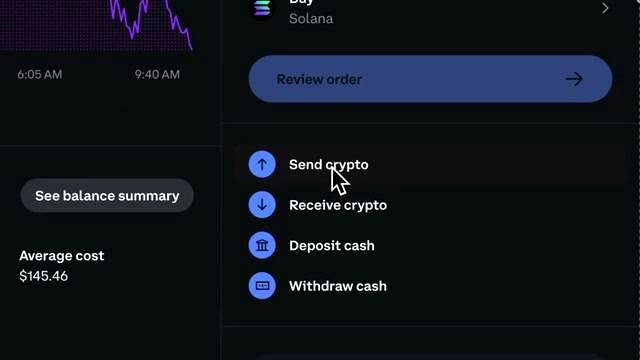
The reason it does not matter which exchange or wallet you are using is that the process is largely the same. Different platforms may have different interfaces, but the steps to transfer crypto do not really change.
It is compared to sending an email: email providers may look different, but the process of sending an email is pretty much always the same.
Example Setup Used
The example shown uses the Coinbase crypto exchange with a Ledger Flex cold wallet. The Ledger wallet is managed through Ledger Live.
How to Transfer Crypto From an Exchange to a Cold Wallet
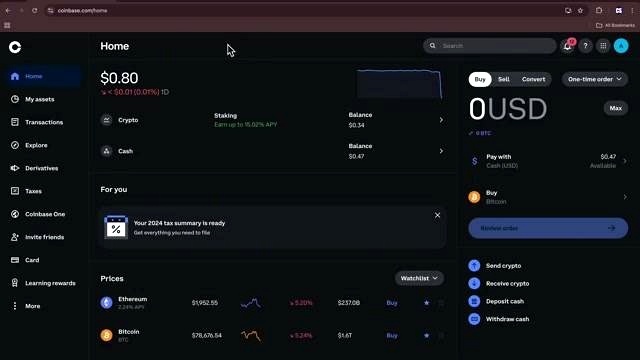
Step 1: Sign In to Your Crypto Exchange
Sign in to whatever crypto exchange you are using by entering your email and password.
Then go to the tab labeled My Assets or My Portfolio, depending on the exchange. This is where you can view all the crypto you own on the exchange.
Step 2: Select the Crypto You Want to Send
Choose the crypto you want to transfer. In the example, the selected asset is Solana.
Then tap the Send Crypto button. This is where you will enter your cold wallet’s public, or receiving, address.
Step 3: Open Your Cold Wallet Management App
Open your cold wallet’s crypto management app. In the example, Ledger Live is used to manage crypto on the Ledger device.
To receive crypto in the wallet, tap the Receive button and select the crypto you want to receive, which in this case is Solana.
Step 4: Connect and Unlock the Device
Connect the Ledger device to the computer, unlock the device, and open the relevant app on the device.
Once that is done, the receiving address will appear. This is the address where the crypto will be sent.
Step 5: Copy the Receiving Address
Copy the receiving address by tapping the copy button.
Then go back to your crypto exchange account and paste that address into the recipient field.
Step 6: Enter the Amount
Enter how much crypto you want to send to your cold wallet. If you want to send everything in that asset account, you can choose Max. If you want to send only part of it, you can enter a smaller amount.
You can also switch between entering the amount in your native currency and entering the amount in the crypto itself.
Step 7: Review the Transaction Details
Review the details before sending. These details include:
- The destination address
- The network being used
- The estimated arrival time
- The total amount being sent
- The network fee
In the example, the Solana transfer shows an estimated arrival time of approximately 23 seconds and includes a 1 cent network fee.
Step 8: Confirm the Transaction
If everything looks good, tap Send Now.
In the example, Coinbase requires 2FA before confirming the transaction, so a code must be entered from the phone.
Step 9: Wait for the Crypto to Arrive
Your crypto will then be on its way to your cold wallet. If it does not show up immediately, that is okay. Give it a couple of minutes.
In the example, after about a minute and refreshing Ledger Live, the Solana appears in the cold wallet.
Where You View the Balance
You can view your crypto in Ledger Live, not on the Ledger cold wallet device itself. Ledger Live, or any crypto wallet management app, is simply an interface used to communicate between your cold wallet and the blockchain.
How to Transfer Crypto From a Cold Wallet Back to an Exchange
Sending crypto from a cold wallet back to an exchange is pretty much the exact same process, but in reverse.
Step 1: Get the Exchange Receiving Address
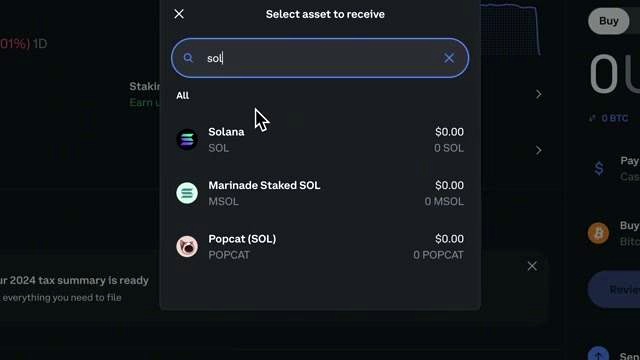
Go back to your crypto exchange account and select the Receive button.
Search for the crypto you are sending from your cold wallet to the exchange. In the example, Solana is selected.
If you are using a mobile phone, you can scan the QR code to get the receiving address. Otherwise, just copy the address.
Step 2: Open the Wallet App and Start a Send
Go back to your crypto wallet management app, find the Send button, and tap it.
Make sure you are on the correct crypto account, then paste the crypto exchange’s receiving address.
Step 3: Check Whether a Memo or Tag Is Required
Some cryptocurrencies require a memo or tag when sending back to a crypto exchange. This helps ensure the transaction is deposited correctly to your account.
Centralized exchanges often require a memo, but only for certain cryptocurrencies such as XRP. Solana does not require a memo in the example, so no memo is needed.
When sending crypto from the exchange, it will show the memo you need to enter if one is required.
Step 4: Enter the Amount
Choose the amount you want to send. In the example, everything is sent by selecting Send Max, then tapping Continue.
Step 5: Review the Details
Review all transaction details, including:
- The crypto being sent
- The destination address
- The amount
- The network fee
- The total to debit
In the example, the network fee is 0.005 SOL.
Step 6: Double Check the Address
Always double check that the address is correct.
Step 7: Confirm on the Cold Wallet
Any time you are using a cold wallet, you have to confirm the transaction on the cold wallet itself.
For the Ledger Flex in the example, this is done by holding to sign. That acts as the digital signature, and the transaction is then confirmed.
Step 8: Wait for the Exchange Deposit
When sending back to a crypto exchange, it could take a couple of minutes or a few minutes, so there is no need to panic if it does not show up immediately.
In the example, after refreshing the exchange page, the Solana arrives safely in the account and takes less than a minute.
Transfer Times Can Vary by Network
How long a transfer takes depends on the cryptocurrency and network being used. Some networks are slower than others.
- Bitcoin can take upwards of an hour.
- Solana only takes about a minute in the example.
The main point is to be patient.
Final Thoughts

Transferring crypto is one part of using a cold wallet to keep your crypto safe. The process stays mostly the same across exchanges and wallets, so once you understand the terminology and the sequence of steps, it becomes much easier to do with confidence.
FAQ
What is a cold wallet?
A cold wallet, or hard wallet, is a physical device that stores keys used to access your crypto offline.
Do wallets and exchanges actually hold crypto?
No. They hold the keys that let you manage your crypto on the blockchain.
What is a public address?
A public address, or receiving address, is the address where crypto is sent.
Are blockchain fees based on the amount of crypto sent?
No. The fees depend on the network and how busy it is, not on the amount being sent.
How can I see the transfer fee before sending?
Start the send process. Before confirming the transaction, the fee will be shown.
Do all cryptocurrencies require a memo or tag when sending to an exchange?
No. Some cryptocurrencies require one, but not all. The example states that XRP may require a memo, while Solana does not.
Why can’t I see my balance on the cold wallet device itself?
In the example, the balance is viewed in Ledger Live. The wallet management app is the interface used to communicate between the cold wallet and the blockchain.
What if the crypto does not appear immediately?
That can be normal. It may take a couple of minutes or longer depending on the network, so you may need to wait and refresh.
Content Source

An Indian crypto journalist covering the developments in the Bitcoin and blockchain industries. Her work helps readers understand key changes in the world of digital assets.