Binance Pay lets you send and receive crypto for free within Binance. You can use it to pay another Binance user with their Binance ID, email, or phone number, and you can also receive crypto through a QR code or payment link.
It also supports sending crypto to people who do not have a Binance account by using an onchain address. The process depends on whether you are sending inside Binance or sending onchain to another wallet or exchange.
What Is Binance Pay?
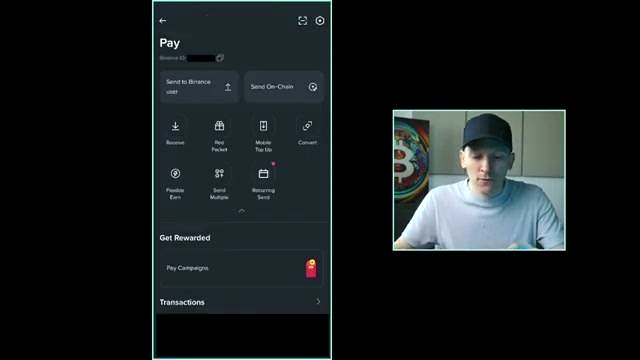
Binance Pay is a feature inside the Binance app that allows users to send and receive crypto for free within Binance. It is available from the icon in the very top right-hand corner of the app, which opens the pay screen.
On the pay screen, you can see the Pay section and your Binance ID. Your Binance ID can be used to send crypto to other Binance users.
How to Access Binance Pay
- Open the Binance app.
- Go to the very top right-hand corner.
- Tap the icon to open the pay screen.
Once you are on the pay screen, you can choose to send or receive crypto.
How to Send Crypto to a Binance User
To send crypto to another Binance user, you need the other person to have a Binance account. The simplest option is to ask them for their Binance ID.
Ways to Find the User
When you tap Send to Binance user, Binance Pay asks how you want to find the user. You can search using:
- Binance ID
- Email linked to their Binance account
- Phone number linked to their Binance account
Using a Binance ID is described as a little easier, because the other person can simply send it to you directly.
Enter the Binance ID
After receiving the Binance ID, paste it in or type it in, then press continue. Binance Pay will search for that user.
If the ID is wrong, it will not go through. It is important to avoid mistakes, because a Binance Pay payment cannot be reversed. Make sure you are completely sure that the Binance ID is correct before sending.
Choose the Crypto and Amount
After selecting the user, choose how much crypto to send. At the top of the screen, you can tap the displayed crypto, such as USDT, to open a list of the crypto assets in your account.
You do not have to send a stable coin. You can send any crypto that you have in your account, including Bitcoin or other available assets. Binance Pay shows how much you have available, and you can choose the amount to send.
Add a Note or Schedule the Payment
You can also add a note to the payee if you want. There is also a calendar icon at the bottom left if you want to schedule the payment.
Confirm and Send
After entering the amount, press continue. Binance Pay will show a confirmation screen with the user ID, and if the person has a nickname or other details, you can check those with them as well.
Review the following before pressing confirm:
- User ID
- Amount being sent
- Account the crypto is coming from
Once you press confirm, the crypto is sent from your account to the other Binance account.
Important Check Before Sending
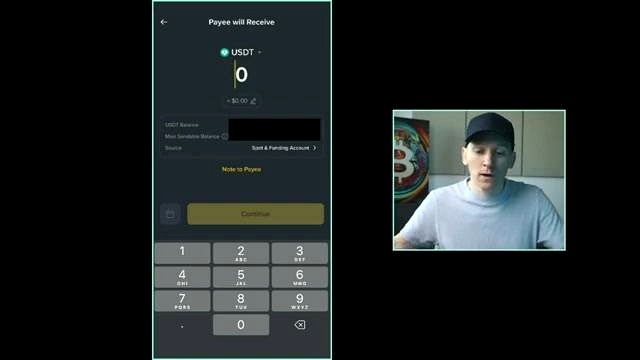
Binance Pay payments cannot be reversed. Because of that, you should make sure the user details are correct before confirming the payment.
- Check the Binance ID carefully
- Confirm the recipient details
- Review the amount and selected crypto
How to Send Crypto Onchain to Another Wallet or Exchange
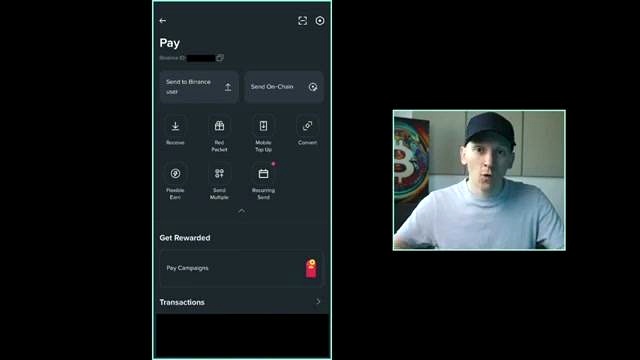
If the recipient does not have a Binance account, you can still send crypto through Binance Pay by using their onchain address. This can be a crypto deposit address or wallet address from another crypto exchange or wallet.
Ask for the Correct Onchain Address
You need to ask the other person for their onchain deposit address for the specific crypto you want to send. For example, if you want to send USDT, they need to give you their USDT deposit address.
Use the Send Onchain Option
- Open Binance Pay.
- Tap Send onchain at the top right-hand side.
- Select the crypto you want to send, such as USDT.
- Choose the network.
- Enter the address provided by the recipient.
- Enter the amount you want to withdraw.
Select the Right Network
The network must match the address details given by the recipient. For example, if they want to receive USDT on the Tron network, you would choose Tron TRX.
Onchain Fees
When sending onchain, you usually have to pay a fee because the transaction is sent on a blockchain. The fee depends on the blockchain. Some blockchains are free, and some require a fee.
In the example shown, sending USDT onchain has a small fee of one USDT, which is $1.
How to Receive Crypto with Binance Pay
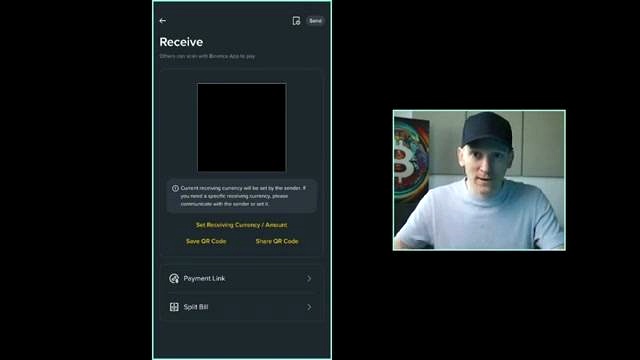
You can also receive crypto using Binance Pay. On the same screen, press Receive on the left-hand side.
Receive by QR Code
The receive screen shows your QR code. If another person has Binance, they can open their app, scan the code, and it will auto-populate with your ID details.
Receive by Payment Link
If you are not next to the other person, you can send a payment link instead.
- Open the payment link option.
- Choose the currency you want to receive.
- Choose the amount you want to receive.
- Send the link through a chat application.
When the other person clicks the link, it opens in their Binance app and auto-populates with your details and the payment request.
Binance Pay Settings
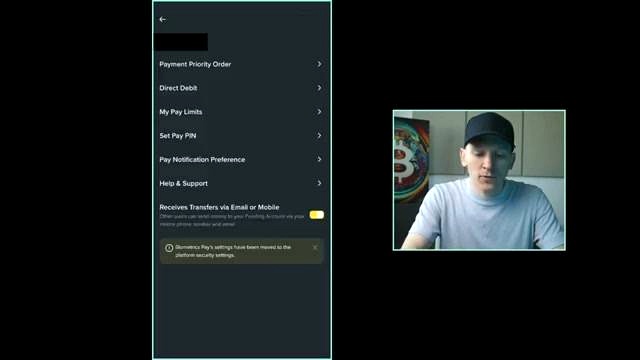
There are also settings in Binance Pay that you may want to adjust. The settings icon is in the top right-hand side of the app.
Payment Priority Order
Payment priority order controls which stable coin is used first when you are sending stable coins.
For example, if you want to send $50 and you have:
- $20 of USDC
- $80 of USDT
If USDT is first in the order, the payment will come from USDT. If USDC is first, Binance Pay can use the USDC first, and then the rest can be taken from USDT if it is second in the order.
Pay PIN
You can also set a Pay PIN. If you enable it, Binance Pay asks for your PIN each time you make a payment.
Biometric Confirmation
Binance may also ask for biometrics that are already logged in, such as Face ID or Touch ID, when sending a payment.
What You Need Before Using Binance Pay
Before sending crypto, you need to have crypto in your Binance account. Once you have crypto available, you can choose the asset and amount directly within Binance Pay.
FAQ
Is Binance Pay free?
Binance Pay allows you to send and receive crypto for free within Binance.
What details can I use to send crypto to another Binance user?
You can use their Binance ID, the email linked to their Binance account, or the phone number linked to their Binance account.
Can I reverse a Binance Pay payment?
No. The payment cannot be reversed, so it is important to make sure the recipient details are correct before confirming.
Do I have to send USDT only?
No. You can send any crypto that you have in your account. Binance Pay shows the available crypto and balance for selection.
Can I send crypto to someone without a Binance account?
Yes. You can use the send onchain option and send crypto to their onchain deposit address or wallet address.
Is there a fee for sending onchain?
Usually yes, because the transaction is sent on a blockchain. The fee depends on the blockchain. Some blockchains are free, and some require a fee.
How do I receive crypto with Binance Pay?
You can receive crypto by showing your QR code on the receive screen or by sending a payment link.
What is payment priority order in Binance Pay?
It decides which stable coin is used first when you make a stable coin payment.
Can I add extra security when making payments?
Yes. You can set a Pay PIN, and Binance may also ask for biometric confirmation such as Face ID or Touch ID.
Source

John Burnell focuses on Bitcoin infrastructure, wallet security and blockchain technology. He writes educational articles explaining how Bitcoin works and how the technology evolves.