Users who sign up through the link mentioned can receive a 20% discount on trading fees and various bonus rewards. The referral code is also used to receive a 20% discount on trading fees and bonus rewards.
How to Create a Bybit Account
To begin, access the official Bybit registration page and create an account.
Account Registration Steps
- Enter your email address or mobile number in the ID field.
- Enter your password.
- Make sure your password is at least eight characters long and includes:
- One uppercase letter
- One lowercase letter
- One number
- Check the agreement box.
- Click Get my welcome gifts.
- Complete the puzzle by sliding it to the right.
- Enter the verification code sent to your email or mobile number.
After these steps, your Bybit account will be successfully created.
Bybit KYC Verification
To start depositing, withdrawing, and trading on Bybit, KYC verification must be completed. Since this step requires facial verification, the process continues on a mobile device.
How to Start KYC on Mobile
- Install the BBE app on your mobile phone.
- Open the app after installation.
- Press the sign up login button below.
- Log in with the account you just created.
- Press the verify now button in the middle.
Identity Verification Steps
- Select your country.
- Check the agreement box below.
- Press confirm.
- Select your nationality again.
- Choose one identification document that you have.
- Select the document type, such as a passport.
- Press continue to take a photo of the ID.
- Position the passport information page within the camera frame and scan it clearly without any light reflection.
Facial Verification
- Place your face within the camera frame.
- Nod your head or blink your eyes.
Once completed, the KYC review process takes about 1 hour. After the review is finished, KYC verification will be successfully completed shortly after.
How to Set Up Google Authenticator on Bybit
For account security, setting up Google Authenticator is recommended.
Google Two-Factor Authentication Setup
- Return to the Bybit PC screen.
- From the menu on the left, click account.
- Click security to configure security settings.
- Click the settings button to activate Google two-factor authentication.
- Complete the email or mobile verification.
- When the Google Authenticator setup pop-up appears, install the Google Authenticator app on your mobile device.
- Open the app after installation.
- Press the plus button in the bottom right.
- Select scan a QR code.
- Scan the QR code shown on the Bybit PC screen.
- Check the six-digit code generated in the Google Authenticator app under the name Bybit.
- Return to the Bybit PC screen.
- Enter the six-digit code in the Google code input field.
- Click confirm.
Google Authenticator will then be successfully set up.
How to Deposit Crypto into Bybit
There are several ways to deposit cryptocurrency into Bybit. The method shown here is the onchain deposit method.
Wallet Types on Bybit
- Funding account: used for deposits and withdrawals
- Unified trading: used for trading
Onchain Deposit Steps
- On the Bybit PC home screen, hover over assets in the top right corner.
- Select funding account.
- Click deposit in the top right corner.
- Select deposit crypto.
- Select the coin you want to deposit.
- USDT is commonly used because transfers are fast and fees are low.
- Select the chain.
- Tron is commonly used because transfers are fast and fees are low.
- Copy the generated deposit address.
Sending Coins from Another Exchange or Wallet
- Go to the exchange or personal wallet where your coins are currently held.
- Click withdraw.
- Select the coin to send and make sure it matches the coin selected on Bybit.
- Select the same network that was selected on Bybit.
- Paste the Bybit deposit address into the address field.
- Enter the withdrawal amount.
- Click withdraw.
After a few minutes, the coins will be deposited into your Bybit funding account.
How to Transfer Funds for Futures Trading

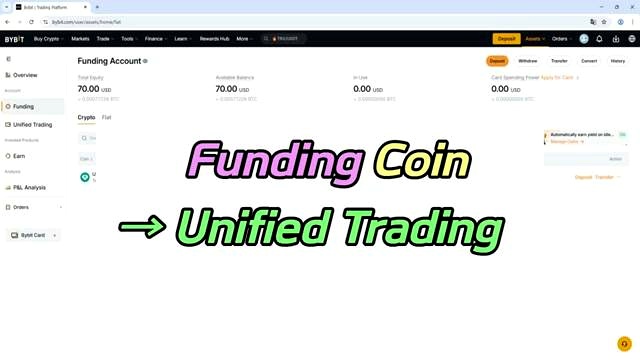
Before trading futures on Bybit, coins must be transferred from the funding account to unified trading.
Transfer Steps
- Go to your funding account.
- Click transfer in the top right corner.
- Set the transfer direction from funding to unified trading.
- Select the coin to transfer.
- Enter the amount to transfer.
After a short moment, the coins will be transferred to unified trading.
How to Trade Futures on Bybit
Once funds are in unified trading, you can move to the futures trading screen and configure your trade settings.
Open the Futures Trading Screen
- Hover over trade in the top menu.
- Click the futures button.
- On the futures screen, click the three-line button in the top left.
- Select the coin you want to trade.
Margin Mode
On the trade panel on the right side, detailed futures trading settings can be configured.
- Isolated: opens a position using only part of your margin
- Cross: opens a position using all of your margin
For beginners, the safer isolated mode is recommended.
Leverage Settings
Leverage can be set up to 100x. Higher leverage increases potential profit, but it also increases the risk of loss. Beginners are recommended to trade with lower leverage.
Order Types
- Limit: places an order at a specified price
- Market: places an order at the current market price
You can also set the trading price and quantity. Your available margin is displayed at the bottom.
Choosing Long or Short
- Choose long if you think the coin price will rise
- Choose short if you think the coin price will fall
Checking Open Positions
After selecting the position direction, click the positions button below to check the real-time status of your open position.
- Entry price: the price at which you entered the position
- Mark price: the current market price
- Liquidation price: the price level at which the position will be automatically liquidated
- Unrealized P&L: your current profit or loss
Risk Management and Closing a Position
If you click the add button in TPSL, you can set a take-profit and stop-loss price for risk management.
To close a position:
- Click the button under close by.
- Choose either limit close or market close.
- Enter the amount and quantity to close.
- Click confirm.
The position will then be successfully closed.
FAQ
What is needed to sign up for Bybit?
You need to enter your email address or mobile number, create a password, enter the referral code, check the agreement box, complete the puzzle, and enter the verification code sent to you.
What are the Bybit password requirements?
The password must be at least eight characters long and include at least one uppercase letter, one lowercase letter, and one number.
Do I need KYC verification to use Bybit?
Yes. To start depositing, withdrawing, and trading on Bybit, you must complete KYC verification.
How long does Bybit KYC review take?
The KYC review process takes about 1 hour.
Why set up Google Authenticator on Bybit?
Google Authenticator is recommended for the security of your Bybit account.
Which wallet is used for deposits and withdrawals?
The funding account is used for deposits and withdrawals.
Which wallet is used for trading?
Unified trading is the wallet used for trading.
What coin and chain are commonly used for deposit?
USDT is commonly used because transfers are fast and fees are low, and Tron is commonly used for the same reason.
What is the difference between isolated and cross margin?
Isolated opens a position using only part of your margin, while cross opens a position using all of your margin.
How do I choose between long and short in futures trading?
Choose long if you think the coin price will rise. Choose short if you think the coin price will fall.
Original Source

Omar Al-Sharif lives and works in the UAE and is involved in the blockchain technology industry. He writes articles on Bitcoin and digital assets as a personal passion, explaining complex topics in simple and understandable language.