Cashing out crypto to a bank account can be done in a simple and structured way. The process described here focuses on doing it efficiently, with low fees, good rates, and with attention to avoiding issues such as suspicious bank activity.
The method uses three main steps: transfer crypto from your wallet to an exchange, sell it, and withdraw the funds to your bank account. While Bitcoin is used as the example, the same process is presented as being the same for other cryptocurrencies as well.
Choosing the Exchange
Before starting, it is important to choose the optimal exchange. This is described as one of the most important steps. The exchange should meet three conditions:
- It is safe.
- It does not charge huge fees.
- It operates in your country and processes bank payments in your region.
The exchanges listed as trusted and established are:
- Kraken
- Coinbase
- Binance
- OKX
The main fees to compare are the commission for selling crypto and the withdrawal fees.
Fee and Availability Notes
- OKX is described as having the most competitive fees, with a 0.08% fee for selling crypto.
- There are no fees for SEPA transfers in Europe on OKX.
- Binance is also described as competitive, with a 0.1% fee.
- Binance and OKX do not operate in the US.
- Kraken has slightly higher fees, but not as high as Coinbase.
- Kraken offers 0% withdrawals in Euro and US dollar, processed in one business day.
- Coinbase may offer instant withdrawal methods, though with higher fees.
Kraken is chosen in this process because it has been around since 2011 and is described as more trusted, reliable, and regulated than OKX and Binance. It also works in both Europe and the US, and is presented as a compromise between low commissions and regulatory compliance.
Before You Begin

You can use the Kraken app, download it from the App Store or Google Play, or use the web version. New users need to complete the KYC process before using it, and profile verification can take a couple of hours.
Step 1: Deposit Crypto to the Exchange
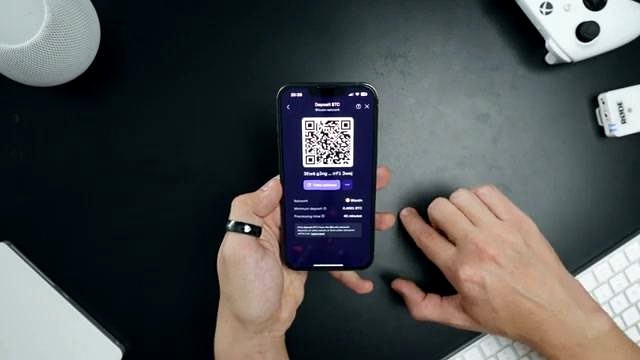
- Open the Kraken app.
- Go to the Portfolio tab.
- Click Deposit.
- Select Bitcoin.
- For the network, choose Bitcoin as well.
- Click the Copy Address button.
This copied address is the address to which you need to send your crypto.
Although Bitcoin is used here, the same step can be done with other assets mentioned, such as Solana, Ethereum, or Dogecoin.
Step 2: Send Crypto From Your Wallet
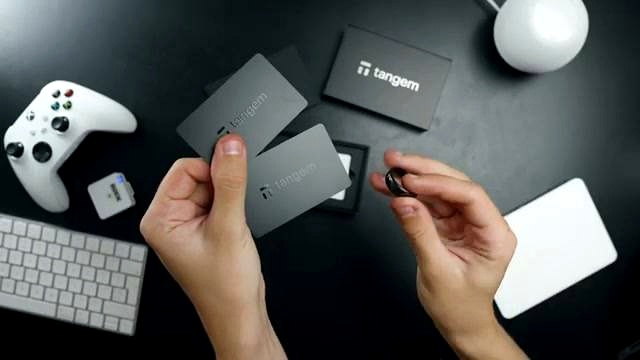
Now send the crypto from your wallet to the address copied from the exchange. The wallet used does not matter as long as it has a send function.
In the example, Tangem wallet is used. It works with hardware wallets and is described as providing an extra layer of security by storing crypto offline. In this setup, no coin can be moved without confirming the action by tapping the card to the phone. However, other wallets can also be used.
- Open your wallet.
- Select Bitcoin.
- Press the Send button.
- Paste the Kraken deposit address into the address field.
- Enter the amount of crypto you want to send.
- Click Next.
Before confirming the transaction, double-check that the address in your wallet matches the one on the exchange. If you have doubts, send a small amount first to make sure your funds do not go to the wrong address. Do not blindly copy and paste.
After confirmation, wait for the transaction to be confirmed on the blockchain and for the funds to be credited on the exchange.
Processing Times Mentioned
- Bitcoin: about 45 minutes
- Ethereum: about 15 minutes
- Solana: about 1 minute
Step 3: Sell the Crypto and Withdraw to Your Bank

Once the crypto has arrived on the exchange, the final step is to sell it and send the money to your bank account.
Selling the Crypto
- In the Kraken app, hit the purple button with the arrows.
- In the top field, choose Bitcoin.
- In the bottom field, choose the currency you need, such as Euro.
- For the order type, choose Convert Now.
- Set the amount you want to sell, such as maximum.
- Review the transaction.
At the review stage, you can see the fees that will be deducted and the final amount in Euro or US dollar that you will receive. If everything looks good, swipe to confirm.
Withdrawing to the Bank Account
- Open the Portfolio tab again.
- Click Withdraw.
- Select Euro or US Dollar.
- Attach the bank account to which you want to withdraw.
- Click to add a new withdrawal method.
- Provide your bank account IBAN number and SWIFT code.
- Confirm your actions.
- Enter the amount you want to withdraw.
- Confirm the transaction.
If you have set it up, you may also be asked to confirm the withdrawal with a 2FA code.
According to the process shown, the money will be credited to your bank account within one to two business days.
Important Security Note

You should never store large amounts of money on crypto exchanges, especially for a long period of time. Exchanges can potentially freeze your account, and your money can be stuck for months.
The safest way mentioned for storing crypto is with a hardware wallet.
FAQ
Can this process be used only for Bitcoin?
No. Bitcoin is used as the example, but the process is described as exactly the same for any crypto.
What should I look for when choosing an exchange?
The exchange should be safe, should not charge huge fees, and should operate in your country so it can process bank payments in your region.
Which exchanges are listed as trusted and established?
The exchanges listed are Kraken, Coinbase, Binance, and OKX.
Which exchange has the lowest selling fee mentioned?
OKX is described as having the most competitive fees, with a 0.08% fee for selling crypto.
Do Binance and OKX operate in the US?
No. It is stated that Binance and OKX do not operate in the US.
Why is Kraken chosen in this process?
Kraken is chosen because it has been around since 2011, is described as more trusted, reliable, and regulated than OKX and Binance, works in both Europe and the US, and offers 0% withdrawals in Euro and US dollar.
Do I need verification before using Kraken?
Yes. New users need to go through the KYC process, and profile verification can take a couple of hours.
How long does it take for crypto deposits to arrive on the exchange?
The times mentioned are about 45 minutes for Bitcoin, about 15 minutes for Ethereum, and about 1 minute for Solana.
What bank details are needed for withdrawal?
You need to provide your bank account IBAN number and SWIFT code.
How long does the bank withdrawal take?
The money is described as arriving in the bank account within one to two business days.
Content Source

Omar Al-Sharif lives and works in the UAE and is involved in the blockchain technology industry. He writes articles on Bitcoin and digital assets as a personal passion, explaining complex topics in simple and understandable language.